
UK Passport Photo Checker Online Free
Use this UK passport photo checker online to test your picture against the GOV.UK digital photo rules before you upload it: at least 600×750 pixels, 50KB to 10MB, a plain light-coloured background and a clear, forward-facing pose.
Written by Navnit Rai, Reviewed by Navnit Rai, Last reviewed 19 November 2026
- Secure & Private
- Results in 10s
- Official sources cited
Official requirements
UK Passport Photo Checker Online Free: Requirements
Taken from the issuing authority's published guidance. Last checked 19 November 2026.
- Photo type
- Digital photo for an online application. A JPEG (.jpg) is the safest format.
- Dimensions
- At least 600 pixels wide and 750 pixels tall
- File size
- At least 50KB and no more than 10MB
- How recent
- Taken in the last month. You need a new photo with every new passport, even if you look the same.
- Image quality
- Clear, in focus, in colour and not altered by computer software
- Background
- Plain and light-coloured, in clear contrast to you, with no shadows behind you
- Framing
- Head, shoulders and upper body. Do not crop the photo, because GOV.UK crops it for you.
- Face and expression
- Facing forwards, looking straight at the camera, plain expression, mouth closed, eyes open and visible, no red eye, no hair in front of your eyes
- Glasses and head coverings
- Do not wear glasses unless you have to. If you must, no sunglasses or tinted lenses, and no frame, glare, reflection or shadow over your eyes. Head coverings only for religious or medical reasons.
- Babies and children
- The child must be on their own. Under 6s do not need to look at the camera or have a plain expression, and under 1s do not need to have their eyes open.
- Printed photos (paper form)
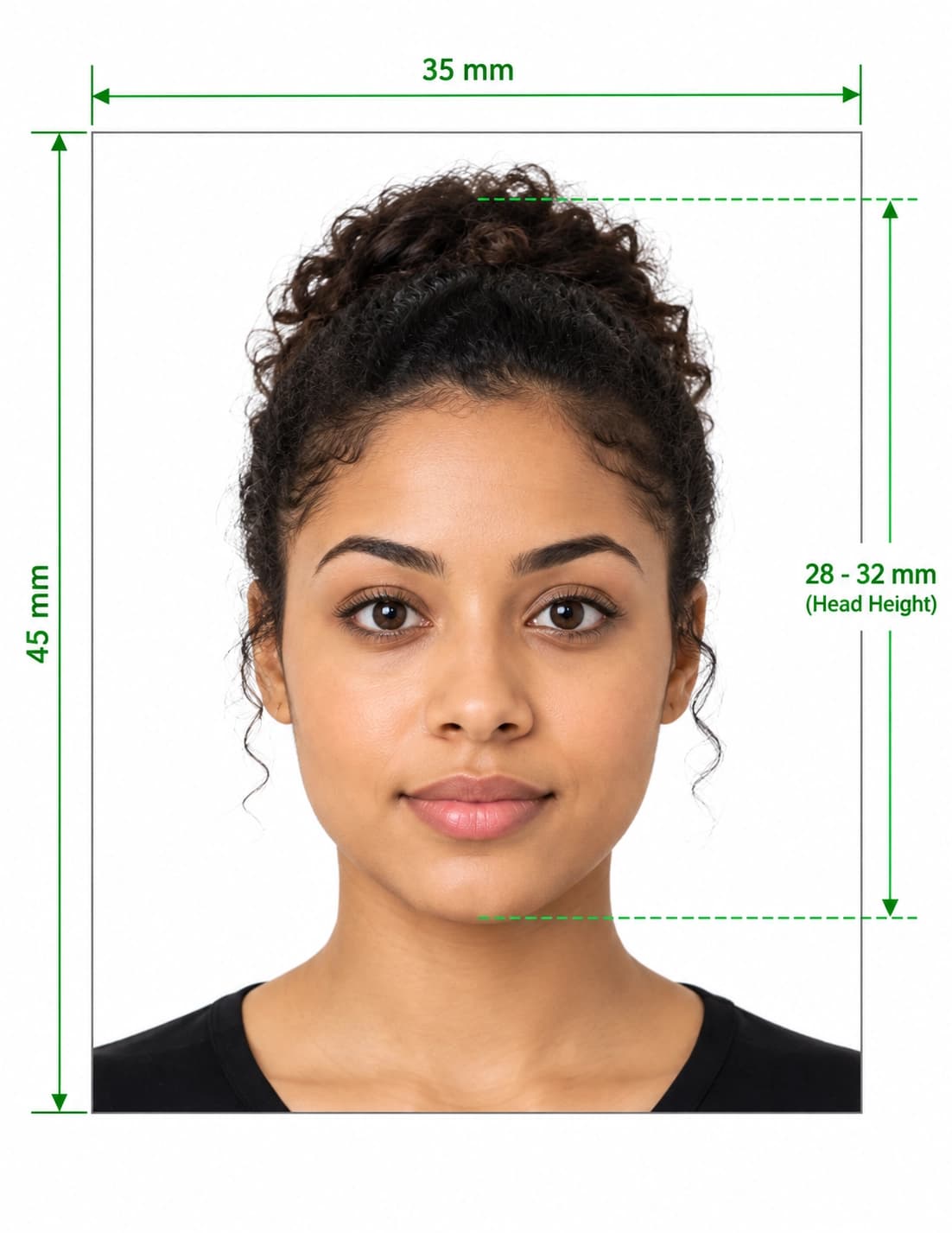
- Two identical prints, 45mm high × 35mm wide, with the head measuring 29mm to 34mm from crown to chin
Source: GOV.UK — Get a passport photo: digital photos(opens in new window)
What the UK passport photo checker tests
Our UK passport photo checker online free tool compares your image with the digital photo rules published on GOV.UK. It measures:
- Pixel size: at least 600 pixels wide and 750 pixels tall.
- File size: at least 50KB and no more than 10MB. A photo that is too small or too heavy fails before a person ever looks at it.
- Quality: sharpness, focus and colour.
- Background: plain, light-coloured, in clear contrast to you and free of shadows.
- Pose: facing forwards, looking at the camera, plain expression, mouth closed, eyes open and visible.
- Face: hair over the eyes, red eye, glare, shadows on the face, and other people or objects in the frame.
For printed photos, the head must measure 29mm to 34mm from crown to chin on a 45mm × 35mm print.
What it cannot check
The checker cannot tell when a photo was taken, so make sure it was taken in the last month. It cannot tell whether software has altered the picture, and it cannot decide whether glasses, a head covering or a medical or religious exemption will be accepted. Only HM Passport Office decides whether a photo is acceptable.
Think of this as a UK passport picture checker for avoidable mistakes. Use this passport photo checker UK applicants can run in seconds to catch problems early, then confirm the details against the official GOV.UK guidance.
How to check passport photo online in three steps
- Take or choose your photo. Ask someone to take it, because you need help if you use your own device. Stand in daylight in front of a plain, light-coloured wall and include your head, shoulders and upper body. Do not crop it.
- Upload it to check passport photo online. Read each result and fix anything flagged, such as shadows, glare, a busy background or a file outside 50KB to 10MB.
- Apply on GOV.UK. Upload the photo during your application, or get a digital photo with a code from a photo booth or shop and enter the code instead. GOV.UK says photos from a booth or shop are more likely to be approved than one taken on your own device.
Common reasons a UK passport photo is delayed or rejected
Your application will be delayed if your photo does not meet the rules. Run it through the UK passport photo checker online to catch the most common causes before you apply:
- The photo was taken more than a month ago.
- The background is not plain and light-coloured, or it does not contrast with you.
- There are shadows on your face or behind you.
- Glasses are tinted, or the frames, glare or reflections cover your eyes.
- You are smiling, your mouth is open or you are not looking straight at the camera.
- Hair falls in front of your eyes, or there is red eye from the flash.
- The photo is smaller than 600×750 pixels or outside the 50KB to 10MB range.
- The photo has been cropped by hand for an online application, or altered by computer software.
Rules that apply only to printed photos
If you apply on a paper form, you need two identical printed photos that are 45mm high and 35mm wide. The image of you, from the crown of your head to your chin, must be between 29mm and 34mm high. Online applications use a digital photo instead, so the pixel rules above apply.
Got questions?
UK Passport Photo Checker Online Free: FAQ
Is this UK passport photo checker online free to use?
Yes. You can test your photo with the checker at no cost. It is independent and not affiliated with HM Passport Office or the UK government.
What size must a UK passport photo be online?
A digital photo must be at least 600 pixels wide and 750 pixels tall, and between 50KB and 10MB. Do not crop it yourself, because GOV.UK crops it for you. Printed photos are 45mm high by 35mm wide.
Can I wear glasses in a UK passport photo?
GOV.UK says not to wear glasses unless you have to. If you must wear them, they cannot be sunglasses or tinted, and your eyes must not be covered by the frames or by any glare, reflection or shadow. Check the current GOV.UK guidance before you take your photo, because rules can change.
How recent must the photo be?
It must have been taken in the last month. You also need a new photo each time you get a new passport, even if your appearance has not changed.
Can I take my own photo with my phone?
Yes, if you use your own device during the application you need someone to help you take it. A selfie is not a good idea, because it is hard to get the framing, distance and straight-on pose right.
Do babies and children follow the same rules?
Mostly. Children must be on their own in the picture. Children under 6 do not have to look directly at the camera or have a plain expression, and children under one do not have to have their eyes open. Babies must not hold toys or use dummies.
Is this UK passport picture checker the same as the GOV.UK check?
No. It is a separate tool that tests the same published rules so you can fix problems before you upload. GOV.UK and HM Passport Office make the final decision on your photo.
Does passing this checker guarantee my photo is accepted?
No. This passport photo checker UK online tool helps you prepare a compliant photo, but it cannot promise acceptance. Only HM Passport Office decides whether a photo is acceptable.
Official sources
Last checked 19 November 2026. This tool is independent and not affiliated with any government. Always confirm current rules with the issuing authority before you apply.
- GOV.UK — Get a passport photo: digital photos(opens in new window)Pixel size, 50KB–10MB file range, one-month rule, background, pose, glasses, children
- GOV.UK — Get a passport photo: printed photos(opens in new window)Two identical prints for paper applications, 45 × 35 mm size, 29–34 mm head height
- GOV.UK — Passport photos: guide for photographers(opens in new window)How face height is measured, from chin to crown rather than the top of the hair
- GOV.UK — Apply online for a UK passport(opens in new window)Where you upload the photo or enter a photo code