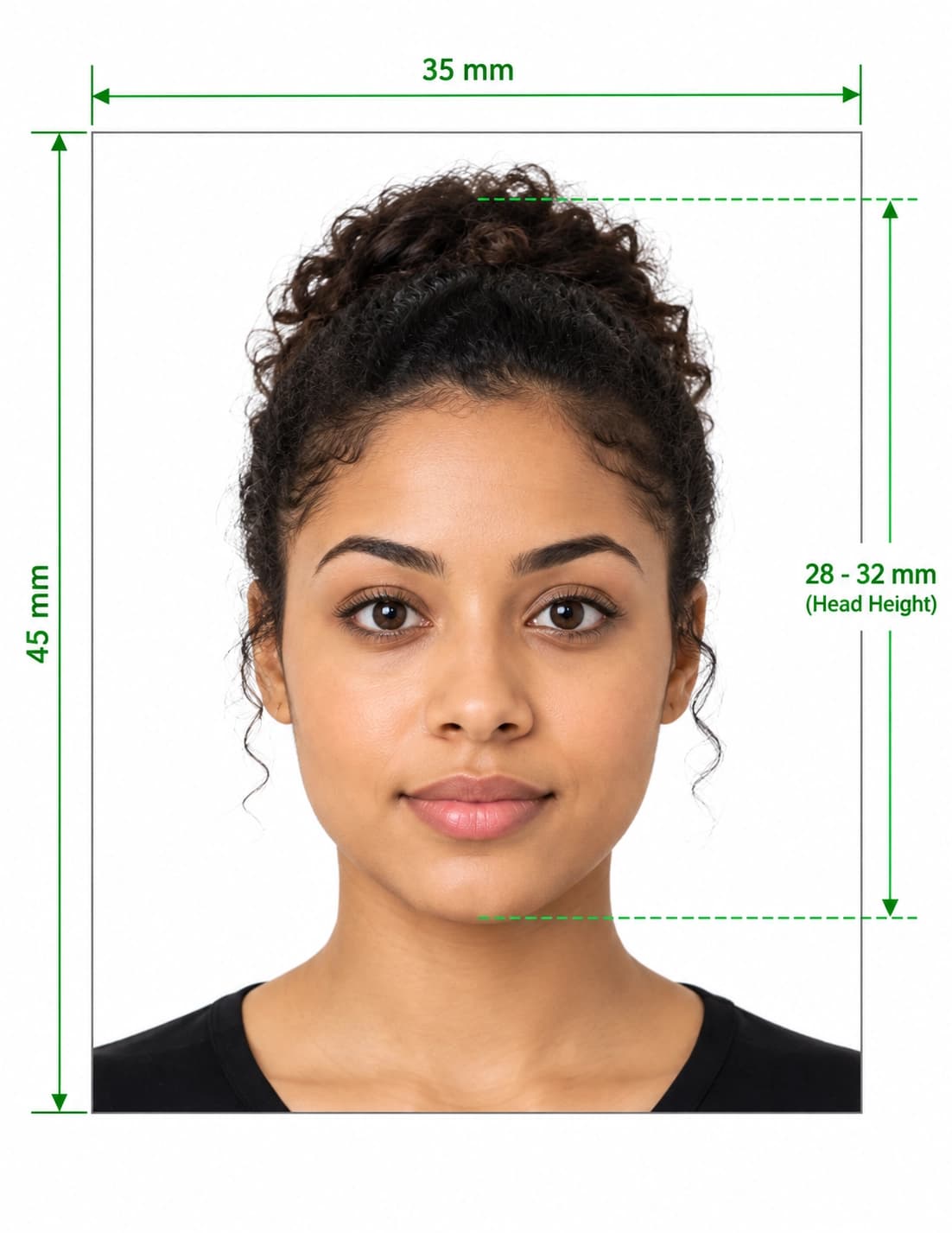
Test your photo against official rules before you apply
Our passport photo checker online measures your photo’s size, head position, background and file size against the published rules of the country you choose, and shows what to fix. Use the passport photo checker online with a phone photo, then crop and download a correctly sized result in about 10 seconds.
Three steps take you from a regular phone photo to a checked, correctly sized photo for 50+ countries.
01
Select Your Country
Pick the document and country, such as a US visa, UK passport, Canadian passport or one of 50+ others. We load that issuing authority's published photo size automatically.
02
Upload Your Photo
Upload a recent JPEG, PNG or WebP photo. The checker measures head size, eye position, centring, background colour, lighting and file size in your browser session.
03
Fix, Crop and Download
In about 10 seconds you see what passes and what fails. Then crop to the exact pixel size and download a digital photo plus a print-ready 6×4″ sheet.
Choose the United Kingdom in the tool and the UK passport photo checker tests your photo against the digital rules published by HM Passport Office on GOV.UK: at least 600 pixels wide and 750 pixels tall, between 50 KB and 10 MB, a plain light-coloured background, glasses only if you have to wear them, and a photo taken in the last month.
GOV.UK also notes that photos from a booth or shop are more likely to be approved, so use the result as preparation, not a guarantee.
Entering the US Diversity Visa programme? Our diversity visa photo checker tests for a square JPEG of 600 × 600 pixels at 240 kB or less, taken within the last 6 months against a plain white or off-white background, with your head 50% to 69% of the image height. The DV-2026 instructions say not to wear eyeglasses.
Submitting last year’s photo, or a manipulated photo, can disqualify an entry, so retake the photo each year.
Rules change. Always confirm the current requirements with the issuing authority before you apply, then use the photo checker to prepare your file.
Why trust this tool
Photo Rules You Can Verify, Not Just Trust
Every rule on this page links to the authority that publishes it. This passport photo checker is independent and not affiliated with any government.
Rules Taken From Official Sources
Country profiles follow the issuing authority's published guidance, and we link the source on this page. We last checked the sources listed below on 19 November 2026.
Clear Pass and Fail Reasons
Each check shows what was measured and why a photo passes or fails, so you can retake it instead of guessing.
Honest About Limits
Only the issuing authority decides whether a photo is accepted. A checker helps you prepare a compliant file but cannot guarantee acceptance.
Your Photo Stays Private
Photos are processed for your session only and are never sold, shared, or used to train other tools. You control the download, start to finish.
Common questions about country rules, renewals, cropping, and printing.
What is a passport photo checker online?
A passport photo checker online is a web tool that measures your photo against an issuing authority's published rules, such as size, head position, background and file size, and tells you what to fix before you apply. Ours covers 50+ countries and works from a phone photo.
How does the checker work?
Choose your country, upload a recent photo, and the checker measures head size, eye position, centring, background and lighting in about 10 seconds. You then see which checks pass or fail, crop to the exact size and download the result.
Does a passport photo checker guarantee my photo will be accepted?
No. Only the passport or visa authority decides, and the U.S. Department of State, for example, says its staff make the final decision on whether a photo is acceptable. A passport photo checker reduces avoidable errors such as wrong size or background but cannot promise approval.
Is there a UK passport photo checker for GOV.UK uploads?
Yes. Pick the United Kingdom as your country and our UK passport photo checker tests your photo against the published GOV.UK digital rules: at least 600 × 750 pixels, 50 KB to 10 MB, a plain light background, and taken in the last month. Always confirm the current rules on GOV.UK before you upload.
What is the diversity visa photo checker requirement?
Diversity Visa entry photos must be a square JPEG of 600 × 600 pixels, 240 kB or less, in colour, taken within the last 6 months against a plain white or off-white background, with the head 50% to 69% of the image height. Choose the United States in our checker to test against these limits.
Which size is a passport photo?
It depends on the country. 35 × 45 mm is common in the UK, EU, India and Australia, while US documents use 2 × 2 inches (51 × 51 mm). Digital pixel size, file size and head height also vary, so select your country and we load the published specification.
Can I take my passport photo on my phone?
Often, yes. Many countries accept a phone photo for online applications, but some require a professionally printed photo. Have someone take it at eye level against a plain wall in even light, and check your issuing authority's rules before you apply.
Can I use this for a passport renewal photo?
Yes. Most countries ask for a new, recent photo for every renewal. The recency window differs, for example one month for UK passports and six months for Diversity Visa entries, so check how recent your authority requires the photo to be.
How do I get my passport photo printed?
Download the print-ready 6×4″ sheet and take it to a pharmacy or photo shop, or upload it to an online print service. Many authorities require photos printed on plain photographic paper with no border, so check your country's rules.
What file formats can I upload?
JPEG, PNG, and WebP files up to 20 MB are accepted, including high-resolution photos straight from a modern smartphone camera.